How to Use Google Gemini for Research: Complete Beginner Guide 2026
 Shubham Thakur
It’s not about using twenty tabs to lose yourself in a sea of data in 2026. I’ve personally shifted a large part of my workflow to AI tools, and among them, Google Gemini stands out as one of the most practical assistants for real research work
However, the reality is that most individuals use Gemini incorrectly since they pose simplistic queries and hope for immaculate responses; however, this is not how things really work.
This guide will teach you how to effectively harness Gemini’s capabilities through genuine research practices, practical applications, and proven strategies.
What is Google Gemini and why does it matters for research?
Unlike other search engines that merely display links, Google Gemini is intended to transcend such limitations and comprehend the context, process complex data, and provide relevant answers to your queries. In my opinion, the main strength of Google Gemini lies in the fact that you are able to verbalize your thoughts and ideas, and the AI reacts like an actual research assistant.
For example, instead of typing a basic search like “AI impact on jobs statistics,” you can ask something more natural and specific like, “Explain how AI is affecting jobs in India with recent trends and examples,” and the difference is clear, you’ll receive a well-structured, easy-to-understand explanation rather than just a list of links to figure out on your own.
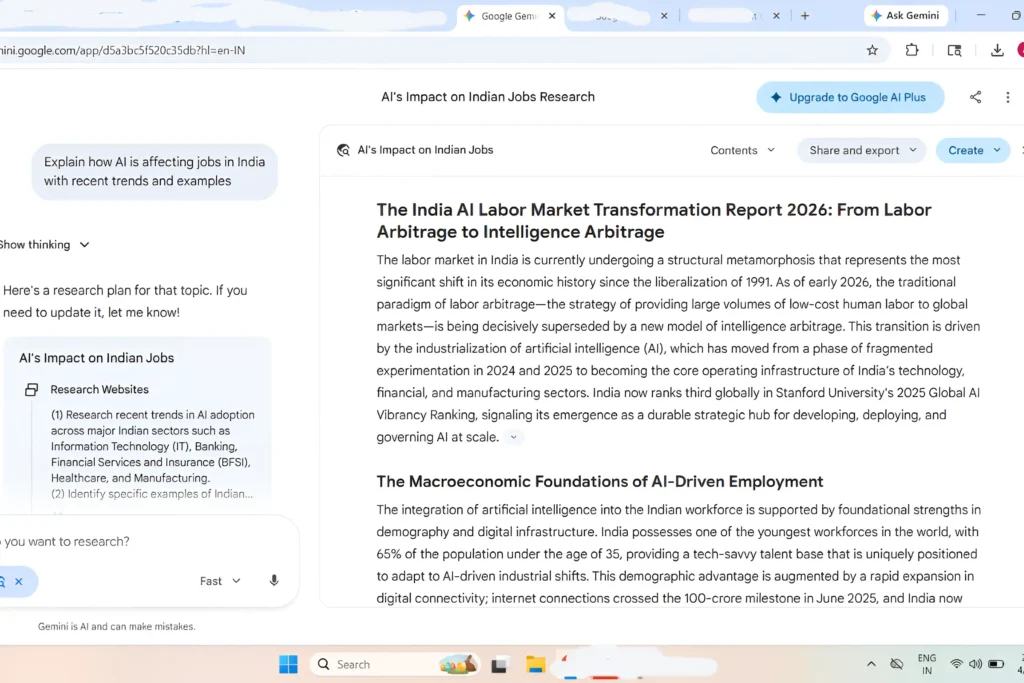
How to Use Google Gemini for Research?
1. Start with a Clear Research Goal
Have a research objective at the very outset when launching into Gemini to know precisely what you aim to research and what results you wish to achieve, since this greatly affects your output. Where an ineffective prompt like “Tell me about AI” generates vague and generalized responses, on the contrary, an effective and purposeful prompt like “Describe how AI is revolutionizing the freelance job market in India with examples” ensures the tool’s ability to provide insightful responses, and it’s simply true that the more purposeful your goal, the better Gemini works.
2. Use Smart Prompts
This is where everything changes, yet it’s also where most beginners go wrong, because instead of asking simple one-line questions, you should use layered prompts that guide the response more effectively.
For example, a prompt like “Explain the topic in simple terms, include recent trends, and give real-world examples” immediately sets clear expectations, and from my experience, the moment I started using this approach, the quality, depth, and usefulness of the answers improved almost instantly.
3. Ask Follow-Up Questions (Like a Conversation)
Don’t treat Gemini like a one-time tool. Treat it like a discussion partner.
For example, the flow should be:
- Ask main question
- Ask for deeper explanation
- Ask for examples
- Ask for data or comparison
4. Use Gemini to Summarize Information
And one of the most valuable features that I make the most out of is the fact that I can copy in large blocks of text at once and get something valuable in return, be it asking Gemini to “summarize this in bullet points” or “list all the key takeaways,” the results are fast, clear, and highly practical, and honestly, this alone saves hours of manual reading and effort.
5. Cross-Check Important Information
Let me be honest, this part is critical: Gemini is incredibly powerful, but it’s not always 100% accurate, which is why I follow a simple approach. I use it to understand topics quickly and build clarity, and then I verify important facts through Google search to ensure accuracy; this hybrid method gives me the best of both worlds, making my research both fast and reliable.
If you want to explore more powerful tools like Gemini, don’t miss our guide on Best Free AI Tools for Students 2026.
WHAT Gemini Is Used For (Real Data)
| Use Case Category | Approx Share | Examples |
| Productivity & Work | ~30–40% | Emails, coding, planning |
| Learning & Research | ~25–30% | Study help, explanations |
| Information Search | ~20% | Replacing Google search |
| Content Creation | ~10–15% | Blogs, scripts, images |
| Shopping & Decisions | ~5–10% | Product comparisons |
| Personal / Fun Use | ~10–20% | Chatting, curiosity |
Real Example: How I Use Gemini for Blog Research
Now let me show you how I do my real-world blog research with Google Gemini. This isn’t about theory anymore, but rather about what I actually do on a daily basis. First of all, when starting to write a new post, I don’t go straight for it; instead, I take 10-15 minutes to work with Gemini.
Step 1: Start with a Simple Question
To begin, I pose a straightforward query that will lead me to gain basic knowledge about the concept being studied, such as “How does Google Gemini benefit research efforts? Give an example.” This enables me to get an overview, even if it’s not entirely accurate, and I consider this a warm-up period for what lies ahead.
Step 2: Refine for Practical Value
Now I refine my prompt: “Give practical use cases of Google Gemini for students and bloggers.” This is where it gets interesting, as responses become more practical
Instead of generic explanations, Gemini now gives:
- Real-life use cases
- Relatable scenarios
- Content ideas I can actually use
For example, I might get ideas like:
- Students using Gemini to summarize chapters
- Bloggers using it to generate outlines
- Researchers simplifying complex topics
Step 3: Go Deeper (This is the Game-Changer)
Most beginners stop at step 2, but this is exactly where the real value begins. I expand on this point by posing questions such as, “What are some of the errors that people usually make when using artificial intelligence in their research?” In addition to adding more value to my article, I will be able to protect myself from spreading false information and creating useful material.
Final Step: Write in My Own Voice (Very Important)
Now comes the most crucial step, never copy paste. What I do next is take everything that I have found and write them again in my own language, tone, and experience, for this is what gives the content its true value. Not only does it help improve the SEO ranking, but it also ensures that the content is unique and trustworthy enough to pass Google Adsense review.
My recommendation would be to use AI-powered research assistants, such as Google Gemini, as your assistant but never your writer. The reason for this is because my personal technique entails using AI tools to enhance my thinking process while ensuring that my writing reflects my personality.
Why Google Gemini is Powerful for Research
Compared to traditional search, Google Gemini offers a much more efficient and intuitive experience with faster understanding, well-structured answers, conversational learning, and time-saving summaries, and since it’s backed by Google, it integrates seamlessly into the broader ecosystem, making it even more practical and powerful for everyday use.
AI Research vs Traditional Search (2026 Comparison)
| Factor | Traditional Search (Google) | AI Tools like Gemini |
| Time to Find Answer | 10–30 minutes | 2–5 minutes |
| Content Format | Multiple links | Structured answers |
| Understanding Level | Medium (self-interpretation) | High (explained clearly) |
| User Effort | High | Low |
| Personalization | Limited | Context-aware |
| Research Efficiency Gain | not applicable | Up to 60–70% faster |
Recent studies and statistics related to the user experience in 2025-2026 have demonstrated that Google Gemini (AI software) can save up to 60% of research time.
Conclusion
The use of Gemini for research goes beyond just acquiring instantaneous information; it involves using the platform to sharpen your skills as a thinker and learner. This involves making use of Gemini as your research tool, enabling you to analyze complicated subjects and come up with new ideas at a fast pace.
It all depends on asking pertinent questions, making effective use of prompts and verifying critical information to make sure it is accurate. Personally, I have learned that combining the use of Gemini with regular searches provides the best results. One thing that you need to keep in mind when using Gemini for research is that while you can get information instantly, you should never use it without first doing an evaluation of your own.



 Anjali Bhardwaj