Top 5 Best Laptops for Students in India 2026 Under ₹50,000 (Complete Buying Guide)
 Shubham Thakur
Choosing the right laptop as a student in 2026 is honestly more confusing than ever, especially with so many options out there. There are Intel vs Ryzen, SSD vs HDD, lightweight vs high-performance machines, it’s easy to feel completely stuck and unsure about what actually matters.
However, from my personal experience, I can tell you something that most people won’t tell you. You don’t need a high-end gaming laptop to get through your student life smoothly. What really matters for a student is a laptop that balances performance, battery life, and smooth usability for your classes, browsing, entertainment, and other activities. Instead of going for those laptops that have impressive specs on paper, you should look for usability and practical experience.
In this guide, I have personally chosen the top 5 latest laptops under ₹50,000 that are perfect for the real needs of students, whether you attend college lectures, take online classes, do coding or programming, or simply use your laptop for assignments, browsing, and multitasking on a day-to-day basis. The recommendations are not only based on specifications, but also on what works in real life.
I have personally used these specifications, and instead of confusing you with technical terms, I will try to simplify everything in a no-nonsense manner to help you make the right choice without overthinking.
Best Overall Laptop for Students
1. ASUS Vivobook 15 (13th Gen i3)
If you ask me to recommend just one laptop under ₹50,000, this would be my top pick without hesitation. The main reason I suggest this is based on real-world experience. One thing I have noticed is that some students have problems with laptops that tend to slow down over time, even within one or two years of use. However, this laptop does not have such problems due to its 13th Gen Intel processor, which is known for being much more efficient compared to other generations.
It runs smoothly for basic use such as Google Docs, Excel, and PowerPoint, and it also runs 10-15 tabs of Chrome and even some coding in Python and Java. In actual use, it remains fast and responsive even after hours of use, which is when most cheaper laptops start to slow down. Overall, it is a perfect choice for all-round students in school and college.
ASUS Vivobook 15 (13th Gen i3) – Key Specifications
| Specification | Details |
| Processor | 13th Gen Intel Core i3-1315U (6 cores, up to 4.5GHz) |
| RAM | 8GB / 16GB DDR4 (expandable) |
| Storage | 512GB SSD (fast boot & app loading) |
| Display | 15.6-inch Full HD (1920×1080), Anti-glare |
| Graphics | Intel UHD Graphics |
| Battery & Weight | 42Wh battery, ~1.7 kg thin & light |
Price starts around ₹42,000–₹45,000 on Amazon/Flipkart and other (may vary depending on offers)
Best for Budget Students
2. ASUS Vivobook Go 14 (Ryzen 5)
It is a powerful and affordable laptop that provides excellent performance from Ryzen along with a lightweight design and good battery life. Therefore, if you are looking for a laptop that is value for money and your budget is low but you want a laptop that provides smooth performance for your daily needs, this is a good choice.
From my real experience, Ryzen 5 laptops at this price are quite rare and usually handle multitasking better than i3 options. It works well for online classes, beginner-level coding, and watching lectures, and its lightweight build makes it easy to carry to college. Overall, it’s perfect for students with a strict budget.
ASUS Vivobook Go 14 (Ryzen 5) – Key Specifications
| Specification | Details |
| Processor | AMD Ryzen 5 7520U (4 cores, up to 4.3GHz |
| RAM | 8GB / 16GB LPDDR5 (faster, onboard) |
| Storage | 512GB PCIe 3.0 SSD |
| Display | 14-inch Full HD (1920×1080), 60Hz |
| Graphics | AMD Radeon 610M Graphics |
| Operating System | Windows 11 Home + MS Office (varies) |
| Weight | ~1.38 kg (ultra-light) |
| Thickness | ~17.9 mm slim design |
| Battery | Fast charging (≈60% in ~49 mins) |
| Build & Features | 180° hinge, webcam shield, military-grade durability |
Price starts around ₹38,000–₹40,000 on Amazon/Flipkart and other (may vary depending on offers)
Best for Performance & Multitasking
3. Dell Inspiron 15 (Ryzen 5)
The Dell Inspiron 15 (Ryzen 5) is a laptop designed for performance and is best suited for multitasking and longevity. Dell is known for its quality, and this laptop is no different. It comes with the Ryzen 5 chip, which is known for its performance. It can easily run 20 Chrome tabs, VS Code, and Zoom at the same time. It is best suited for engineering students and coding.
Dell Inspiron 15 (Ryzen 5) – Key Specifications
| Specification | Details |
| Processor | AMD Ryzen 5 7530U (6 cores, up to 4.5GHz) |
| RAM | 8GB / 16GB DDR4 (expandable up to 32GB) |
| Storage | 512GB PCIe NVMe SSD |
| Display | 15.6-inch Full HD, Anti-glare (120Hz in some variants) |
| Graphics | AMD Radeon Vega Graphics |
| Operating System | Windows 11 Home + MS Office (varies) |
| Battery | ~41Wh (average 5–7 hours usage) |
| Weight | ~1.6–1.7 kg |
| Build Quality | Durable Dell chassis, business-class reliability |
| Ports & Connectivity | USB-C, USB-A, HDMI, Wi-Fi, Bluetooth |
Price starts around ₹45,000–₹50,000 on Amazon/Flipkart and other (may vary depending on offers)
Best for Basic Use (Students & Beginners)
4. HP 14 (13th Gen i3)
The laptop, an HP 14 (13th Gen i3), is a great option for students and newbies who want a laptop that can perform all their basic tasks efficiently without burning a hole in their pockets to spend extra on other high-end features. Not everyone needs to have high-end specifications in their laptop, and this one does justice to the fact.
It is especially apt for school-going students who use their laptops only to write notes, do assignments, attend online classes, and maybe browse the web. The laptop is lightweight, making it easy to carry around to school or tuition classes. All in all, this laptop is a decent option for basic usage, providing a hassle-free experience to those who require nothing more than basic computing.
HP 14 (13th Gen i3) – Key Specifications
| Specification | Details |
| Processor | 13th Gen Intel Core i3-1315U (6 cores, up to 4.5GHz) |
| RAM | 8GB DDR4 (expandable up to 16GB) |
| Storage | 512GB PCIe NVMe SSD |
| Display | 14-inch Full HD (1920×1080), Anti-glare |
| Graphics | Intel UHD Graphics |
| Operating System | Windows 11 Home + MS Office (varies) |
| Weight | ~1.4 kg (lightweight) |
| Battery | ~6–8 hours typical usage |
| Build Quality | Micro-edge design, compact & durable |
| Ports & Connectivity | USB-C, USB-A, HDMI, Wi-Fi, Bluetooth |
Price starts around ₹40,000–₹45,000 on Amazon/Flipkart and other (may vary depending on offers)
Best Value for Money
5. Lenovo IdeaPad Slim 3 (13th Gen i3)
Lenovo IdeaPad Slim 3 (13th Gen i3) is one laptop that offers value for money, and that too in terms of performance, build, and pricing. This is the laptop that I recommend to my friends who ask me to suggest a laptop that offers the maximum value for money.
This laptop offers balanced specifications, clean and smooth performance, and the build quality of the laptop from Lenovo, which is reliable. The laptop performs all tasks smoothly in real-time usage, even after months of usage. It does not show any signs of slowing down, and that in itself is a testament to the performance and build quality of the laptop. This laptop is ideal for students who want the maximum value for money.
Lenovo IdeaPad Slim 3 (13th Gen i3) – Key Specifications
| Specification | Details |
| Processor | 13th Gen Intel Core i3-1315U (6 cores, up to 4.5GHz) |
| RAM | 8GB DDR4 (expandable up to 16GB) |
| Storage | 512GB PCIe NVMe SSD |
| Display | 15.6-inch Full HD (1920×1080), Anti-glare |
| Graphics | Intel UHD Graphics |
| Operating System | Windows 11 Home + MS Office (varies) |
| Weight | ~1.6–1.7 kg |
| Battery | ~5–7 hours usage |
| Build & Features | Military-grade durability, webcam privacy shutter |
| Ports & Connectivity | USB-C, USB-A, HDMI, Wi-Fi, Bluetooth |
Price starts around ₹40,000–₹45,000 on Amazon/Flipkart and other (may vary depending on offers)
Things to Consider Before Buying a Laptop for Students
1. Processor (Most Important)
Processor is the most important factor. Go for a 13th Gen Intel i3 or Ryzen 5 for better performance, and avoid older 10th or 11th Gen i3 processors.
2. RAM & Storage
For RAM and storage, aim for at least 8GB RAM and a 512GB SSD, as modern laptops under ₹50,000 now commonly offer fast SSDs and Full HD displays, making them perfect for smooth everyday student use.
3. Battery Life
At least 5–7 hours for college use
4. Weight
Under 1.7 kg = easy to carry
My Honest Advice
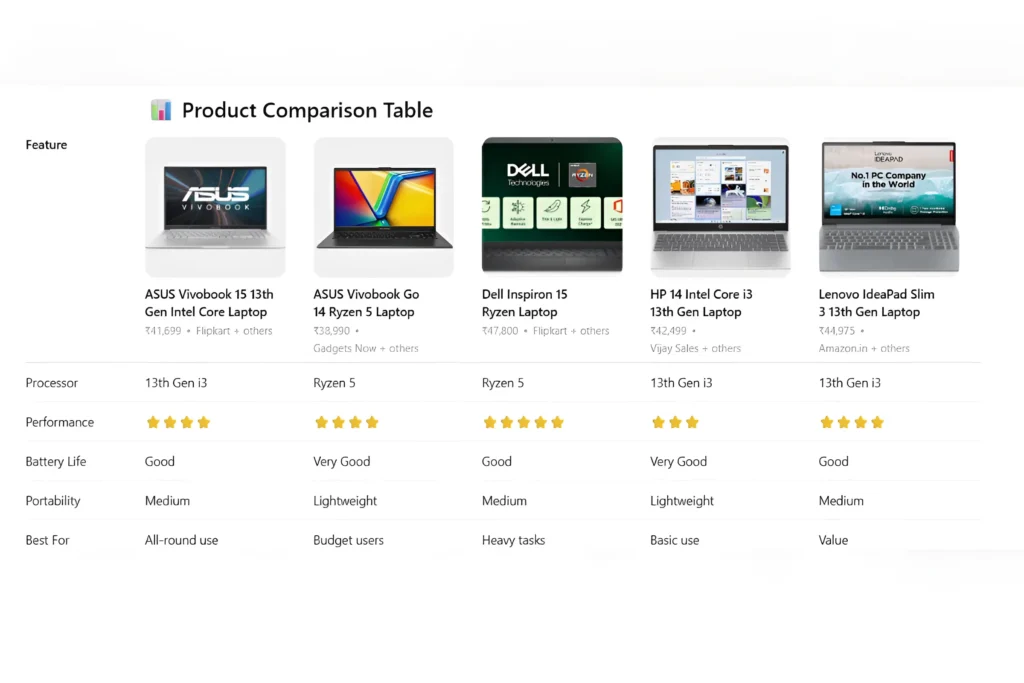
In my honest experience, if I were to purchase one now, I would recommend the following based on actual needs: if your budget is tight, consider the ASUS Vivobook Go 14, the ASUS Vivobook 15 if you want the best value for money, the Dell Inspiron if you’re into coding, the HP 14 if you want something for basic daily use, and the Lenovo IdeaPad Slim 3 if you want something balanced. Do not overthink the specs; think about actual usage.
FAQs
Which is the best laptop for students under ₹50,000 in India (2026)?
If you want an all-rounder, the ASUS Vivobook 15 (13th Gen i3) is the best overall choice. It offers a strong balance of performance, battery life, and smooth daily usage for students.
Is 8GB RAM enough for students in 2026?
Yes, 8GB RAM is enough for most students for tasks like online classes, browsing, assignments, and light coding. However, if you plan to multitask heavily or code frequently, upgrading to 16GB is a smarter long-term choice.
Should students choose Intel or Ryzen processors?
Both are good, but Ryzen 5 processors usually offer better multitasking performance, while 13th Gen Intel i3 provides stable and efficient everyday usage. Your choice should depend on whether you prioritize performance (Ryzen) or balanced efficiency (Intel).
Can I use these laptops for coding and programming?
Yes, all the laptops listed can handle beginner to intermediate coding (Python, Java, web development). For smoother performance with tools like VS Code and multiple tabs, Ryzen 5 or higher is recommended.
Is SSD really important in a student laptop?
Absolutely. SSD storage makes a huge difference in speed, your laptop boots faster, apps open instantly, and overall performance feels smooth. Avoid HDD-based laptops in 2026.
 Anjali Bhardwaj