Best Laptop for Students in India 2026: Complete Buying Guide (Budget to High-End)
 Anjali Bhardwaj
Buying a laptop as a student in India can feel confusing; I’ve been there myself. Back in my college days, I made a mistake. I bought a cheap laptop just to save money, thinking “basic work hi toh karna hai.” But within a year, it started lagging during online classes, Chrome tabs would crash, and even opening PowerPoint felt slow. That’s when I realized, choosing the right laptop is not about price, it’s about value.
Why This Guide Will Help You
This guide isn’t just another list of laptops you’ll glance at and then forget about. It’s a guide that comes from real experience and helps you make a smart decision, unlike other guides out there. I have seen how quickly you can throw your money away on the wrong specs, whether you’re overpaying for features you don’t even use or settling for a low-performance laptop that will hold you back in the long run.
That’s why this guide is designed to help you choose the right laptop for your course, whether it’s engineering, coding, design, or general studies, without you guessing what works for each of those or what the real difference between budget and performance is, or how to make the most out of your money to ensure you don’t regret your purchase in a few years’ time, whether you’ll still be comfortable with the laptop you chose or whether you’ll already be thinking about a new one.
What Students Actually Need in 2026
Let’s be honest, most students don’t need a ₹1.5 lakh gaming laptop. Because most of our daily tasks include:
- Online classes (Zoom, Google Meet)
- Assignments (Word, Excel, PPT)
- Browsing + research
- Coding or light editing
- Watching videos or OTT
For these tasks, experts suggest focusing on SSD storage, 8GB+ RAM, and modern processors instead of unnecessary high-end GPUs.
My rule is simple: always decide based on your usage first. If you’re a BA/BCom student, a basic laptop is enough. For B.Tech or coding, you’ll need better performance, and for design or video editing, go high-end. This one step alone can save you thousands of rupees.
Also Read: Latest Samsung Galaxy S26 Ultra: Real-World Review and Complete Overview
Also Read: Poco X8 Full Review. Specification and Launch Price 2026
Best Laptops by Budget in 2026
Laptops Under Budget Range of ₹25,000 – ₹40,000
Best for: Notes, assignments, browsing, and online classes
Recommended Specifications:
- Intel i3 or Ryzen 3 processor
- Minimum 8GB RAM
- 256GB to 512GB SSD
Popular Options:
- HP 15s
- Lenovo IdeaPad Slim 3
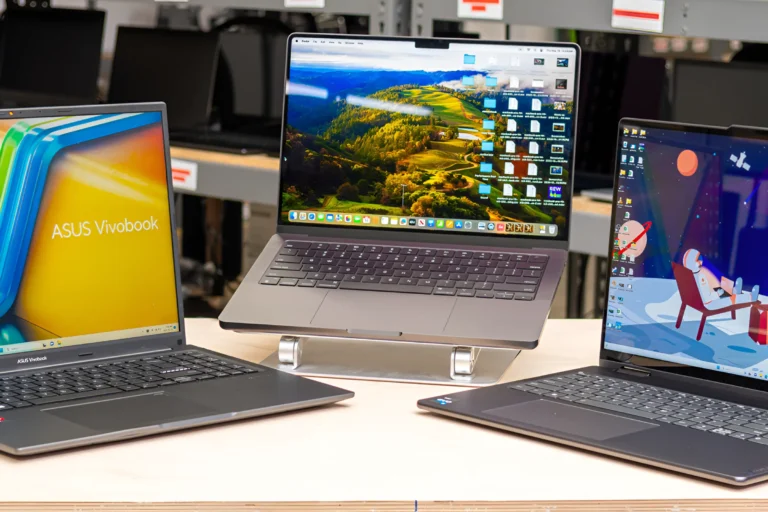
- ASUS VivoBook 15
These laptops handle everyday academic work smoothly, but they are not built for heavy multitasking, gaming, or demanding software. I will suggest you to avoid Celeron processors unless your budget is extremely limited, as they can feel slow even for basic use over time.
Mid-Range (₹40,000 – ₹70,000)
Best for: Coding, Multitasking, College Projects
Recommended Specifications:
- Intel i5/Ryzen 5 Processor
- 8-16 GB RAM
- 512 GB SSD
- Full HD Display
What makes this range special:
- Smooth & Reliable Performance
- Future-Proof: 3-4 years
- Better Build Quality
Based on my personal experience, going from 8 GB RAM to 16 GB RAM was definitely worth it because I started coding and needed to multitask as well.
Premium Range (₹70,000+)
Best for: Designers, video editors, advanced coding
Top options include:
- Apple MacBook Air (M2/M3)
- ASUS ZenBook
- Dell XPS series
These laptops offer:
- Excellent battery life
- Premium build
- Powerful performance
For instance, the Apple MacBook Air can smoothly handle editing, coding, and other tasks while providing battery life that lasts throughout the day. This laptop is great for students due to its smooth performance. However, based on my personal experience, it is recommended that you only invest in this premium laptop if you need that kind of power for work.
Important Features You Should NEVER Ignore
1. RAM (Most Important)
- 8GB = Minimum
- 16GB = Best for future
2. Storage (SSD Only )
- 256GB = Minimum
- 512GB = Ideal
3. Processor (Brain of Laptop)
- Basic: i3 / Ryzen 3
- Medium: i5 / Ryzen 5
- Heavy: i7 / Ryzen 7
4. Battery & Weight (Underrated but Crucial)
- Weight: Under 1.7 kg preferred
- Battery: At least 6–8 hours
5. Display Quality
- Full HD (1920×1080)
- IPS panel
Common Mistakes Students Make
From my experience I think this is one area where many students often get it wrong, is that they often make a mistake because they’re in a hurry to make this decision. Some end up buying the cheapest available laptop without even looking at the specs, or they end up buying one based on looks without even looking at the actual features. Some may not even bother to look at upgrade options, and this is important too. Another area where they often get it wrong is when they opt to buy a gaming laptop even when they don’t necessarily need one. As one Reddit user so aptly puts it, “Battery life is king… and don’t overpay for features you won’t use.”
Windows vs Mac: What Should You Choose?
When choosing between Windows and Mac, it really comes down to your needs. Go for a Windows laptop if you rely on software like AutoCAD or Tally and want more budget-friendly options. On the other hand, choose a Mac if you prefer longer battery life, smoother performance, and are into editing or creative work.
Also Read: Latest Samsung Galaxy S26 Ultra: Real-World Review and Complete Overview
Also Read: Poco X8 Full Review. Specification and Launch Price 2026
Final Buying Advice
So, if there’s one thing you take away from all of this blog, it’s to not buy the cheapest laptop out there, but the right one for your needs. If your budget is tight, based on my experience, I’d recommend an i3 with 8GB RAM and SSD. If you’re looking for the best, an i5 or Ryzen 5 with 16GB RAM is the best bet. And, of course, for the ultimate experience, go for a MacBook or an ultrabook.
Conclusion
Choosing the best laptop for students in India in 2026 isn’t about following trends, it’s about understanding what you actually need. I’ve made those mistakes myself, so you don’t have to. Take your time, compare options carefully, and invest wisely. The right laptop won’t just support your studies, it’ll make your entire college life smoother and more productive.
FAQs
Which laptop is best for students in India in 2026?
The best laptop depends on your needs, but for most students, an i5 or Ryzen 5 processor with 8–16GB RAM and SSD storage offers the best balance of performance and price.
How much RAM is enough for a student laptop?
8GB RAM is the minimum for smooth daily use, but 16GB is recommended if you want better multitasking and future-proof performance.
Is 256GB SSD enough for college use?
Yes, 256GB SSD is enough for basic use like assignments and browsing, but 512GB is a safer choice if you store lots of files or software.
Should students buy a gaming laptop for college?
Not really, unless you actually need it. Gaming laptops are heavier, expensive, and have lower battery life compared to normal student laptops.
Which is better for students: Windows or Mac?
Windows laptops are more budget-friendly and support more software, while MacBooks are great for battery life, smooth performance, and creative work.
What is the ideal budget for a student laptop in India?
Most students can find a good laptop between ₹40,000 to ₹70,000 that will easily last for several years.
How long should a student laptop last?
A good laptop with proper specs should comfortably last around 3–5 years without major issues.
Also Read: https://inbriefly.in/pan-card-new-rules-from-1-april-2026-documents-required-major-changes-full-guide/
Also Read: https://inbriefly.in/latest-samsung-galaxy-s26-ultra-real-world-review-and-complete-overview/
Also Read: https://inbriefly.in/poco-x8-full-review-2026-specs-price/
 Shubham Thakur
 Rasedul